Mobile Money - Zambia
Mobile Money is a popular alternative payment method in Zambia, supported by EBANX to offer a convenient and secure way for customers to complete transactions using their mobile wallets: MTN Mobile Money, Airtel Money and Zamtel Kwacha. This method allows Zambian customers to make purchases directly from their mobile phones, leveraging the local mobile network operators' infrastructure to access funds.
By integrating Mobile Money through EBANX, you can provide Zambian customers with a trusted, widely used payment option that aligns with local preferences. This method relies on a server-to-server flow where the customer confirms the charge by entering their wallet PIN on the handset, and the final status arrives asynchronously. This guide outlines the key concepts and implementation details required to integrate Mobile Money via API.
Requirements
- API authentication - All API requests must be authenticated using JWS (JSON Web Signature). The legacy
integration_keyis being deprecated - if you still use it, follow the Migration Guide to transition to JWS. If you don't have credentials yet, complete the Merchant Signup Form. - Familiarity with EBANX Direct - This setup follows the same general structure as other payment methods, with a few unique parameters.
How it works
- Payment request - Your customer chooses Mobile Money as the payment method at checkout, selecting their operator and entering the phone number linked to their mobile wallet.
- PIN confirmation - After initiating the transaction, the customer receives a prompt on their handset from the mobile network operator, requesting their wallet PIN to confirm the payment.
- Asynchronous confirmation - Once the customer enters their PIN, the operator authorizes the payment. EBANX is notified of the result asynchronously and also queries the provider on a schedule, so the final status may take a few moments to arrive.
- Settlement - EBANX processes the transaction, ensuring funds are transferred securely from your customer's mobile wallet to your account.
Key information
- Supported mobile money products: MTN Mobile Money, Airtel Money and Zamtel Kwacha.
- Payment flow: server-to-server. The customer approves the charge with their wallet PIN on their handset, and EBANX confirms the final status asynchronously.
- Country and currency:
zm/ZMW. - Minimum amount per transaction:
- MTN: 1 ZMW
- Airtel: 1 ZMW
- Zamtel: 5 ZMW
- Maximum amount per transaction: 10,000 ZMW.
- Daily wallet limit: 20,000 ZMW per customer, applied by the mobile network operator.
- Approval window: calculated from
open_date- MTN: 5 minutes
- Airtel: 5 minutes
- Zamtel: 1 minute
- Status updates: EBANX notifies you on every status change and also checks the payment status periodically, so confirmed (CO) can arrive a few minutes after the customer approves.
- Refunds: supported for confirmed payments, both full and partial. Refunds cannot exceed the captured amount and cannot be canceled after being requested.
- Refund window: refunds can be requested up to 6 months after the payment date.
- Refund processing time: mobile money refunds are typically processed within 72 hours of the refund being sent.
Instructions
Follow the steps below.
- Select your environment
Select the appropriate environment for your integration. Use the sandbox environment for testing, or the production environment for live transactions. Use the URL for your HTTP requests based on your selection.
Sandboxhttps://sandbox.ebanxpay.com/ws/direct - Define your parameters
Once you've defined your parameters, these details will be used to construct the HTTP request, which initiates the Mobile Money transaction and enables EBANX to process the payment accurately and securely.
Basic parameters
Parameter Requirement Description integration_keyRequired Your EBANX integration key payment_type_codeRequired Mobile money product the customer is paying with. Send mtnfor MTN Mobile Money,airtelfor Airtel Money orzamtelfor Zamtel Kwacha. See the table below.countryRequired Set to zmfor ZambiaPayment type codes
Payment type code Mobile money product Mobile network operator mtnMTN Mobile Money MTN Zambia airtelAirtel Money Airtel Zambia zamtelZamtel Kwacha Zamtel Customer data
Parameter Requirement Description nameRequired Customer name emailRequired Customer e-mail phone_numberRequired Customer phone number The phone number is crucial for this payment process, as it triggers the handset prompt asking the customer to validate and confirm the charge. Be sure to provide it in full international format, including the country code (260 for Zambia).
Note- The customer only enters their wallet PIN on the handset, so the full name and e-mail address must be collected by the merchant in its own checkout, outside the Mobile Money payment flow.
- If the merchant cannot collect the customer's full name and e-mail address, dummy values may be passed in these fields.
Charge parameters
Parameter Requirement Description merchant_payment_codeRequired Unique merchant payment code currency_codeRequired Supported value: ZMWamount_totalRequired Total amount to be charged (1 to 10,000 ZMW per operator) - Sample request
Use the following example to initiate a request.
Shellcurl -X POST \
--location 'https://sandbox.ebanxpay.com/ws/direct' \
--header 'Content-Type: application/json' \
--data '{
"integration_key": "{{integration_key}}",
"payment": {
"name": "John Doe",
"email": "john.doe@example.com",
"phone_number": "260961234567",
"country": "zm",
"payment_type_code": "mtn",
"merchant_payment_code": "{{unique_merchant_code}}",
"currency_code": "ZMW",
"amount_total": 99.85
}
}' - Sample response
A successful request returns a response like the example below.
JSON{
"payment": {
"hash": "59acc5f00945fa382ab051651440826da7701533249b3a475",
"country": "zm",
"merchant_payment_code": "{{unique_merchant_code}}",
"status": "PE",
"status_date": "{{YYYY-MM-DD HH:mm:ss}}",
"open_date": "{{YYYY-MM-DD HH:mm:ss}}",
"confirm_date": null,
"transfer_date": null,
"amount_br": "99.85",
"amount_ext": "99.85",
"amount_iof": "1",
"currency_rate": "1",
"currency_ext": "ZMW",
"due_date": "{{YYYY-MM-DD}}",
"instalments": "1",
"payment_type_code": "mtn",
"pre_approved": false
},
"status": "SUCCESS"
}At this stage, the payment will appear as pending (PE) in yourMerchant Areachevron_right - Customer makes payment
Shortly after a successful charge response, your customer will receive a prompt on their mobile device asking them to enter their wallet PIN to confirm the payment.
- Monitor payment for status changes
Notifications
-
EBANX will send a notification whenever a payment status changes.
-
Make sure your system is set up to receive notifications from EBANX for any changes in payment status.
Status
-
After receiving a notification that status has changed, retrieve the payment status.
-
When a payment is confirmed, the status will change from pending (PE) to confirmed (CO). If the customer does not complete the payment, the status will eventually change to canceled (CA).
The charge response only confirms that the payment was created and the prompt was sent to the customer. At that point the payment status is pending (PE).
Only a confirmed (CO) status means the payment was successful. Do not treat pending (PE) as a successful payment.
A canceled (CA) status is final: the payment expired or was declined, no further notification is sent, and a new payment must be created.
- To retrieve the status, send a POST request to the
ws/queryendpoint with yourintegration_keyand either thehashreturned in the charge response or your ownmerchant_payment_code.
Shellcurl -X POST \
--location 'https://sandbox.ebanxpay.com/ws/query' \
--header 'Content-Type: application/json' \
--data '{
"integration_key": "{{integration_key}}",
"hash": "59acc5f00945fa382ab051651440826da7701533249b3a475"
}'-
The response returns the payment object, where
payment.statusis the authoritative status: pending (PE), confirmed (CO) or canceled (CA).
-
- Congratulations!
You have successfully integrated Mobile Money.
For more information, refer to theDirect API reference guidechevron_right
Possible errors
The EBANX Direct API validates the request before the charge reaches the mobile network operator. If a required field is missing or invalid, the API returns status: ERROR with the code below in status_code and no payment is created.
Validation errors returned by the EBANX API
| Code | Message | How to fix |
|---|---|---|
| BP-DR-3 | Field payment.currency_code is required | Send currency_code with the value ZMW. |
| BP-DR-5 | Field payment.amount_total is required | Send amount_total with the amount to be charged. |
| BP-DR-30 | Field payment.amount_total is not a valid number | Send amount_total as a number, using a dot as the decimal separator. |
| BP-DR-173 | Field payment.amount_total cannot contain "," | Remove thousand separators from amount_total. |
| BP-DR-14 | Parameter payment.name can have 100 characters maximum | Truncate the customer name to 100 characters. |
| BP-DR-15 | Field payment.email is required | Send email. If you cannot collect it, send a dummy address, as described in the customer data section. |
| BP-DR-31 | Field payment.phone_number is required | Send the phone number linked to the customer's mobile wallet. |
After the charge is accepted, a payment that the customer does not approve is not an API error: it stays pending (PE) and changes to canceled (CA) when it expires.
For the complete list of codes, see the API Error Codes reference.
Request and configuration errors
| Condition | EBANX reason (code) | Description | Suggested merchant action |
|---|---|---|---|
Phone is not 260 + [5/7/9] + 8 digits, after normalizing 0XXXXXXXXX and 2600XXXXXXXXX to 260XXXXXXXXX | INVALID_PARAMETERS | Invalid parameters ("Invalid Zambia phone number") | Ask the customer for a valid Zambian mobile number and create a new payment. |
| Payment option not found for the country and gateway | INVALID_PARAMETERS | Invalid parameters | Contact EBANX; configuration issue, not customer-fixable. |
Errors returned when the payment is created
| EBANX reason (code) | Description | Suggested merchant action |
|---|---|---|
INCORRECT_CUSTOMER_DATA | Incorrect customer data | Ask for a corrected number and retry with a new payment. |
INVALID_AMOUNT | Value sent in the amount field is incorrect | Send an amount within the limits for the wallet. |
INVALID_PARAMETERS | Invalid parameters | Check the request fields; contact EBANX if it persists. |
TRANSACTION_NOT_FOUND | Transaction not found | Contact EBANX. |
TECHNICAL_ERROR | Technical failures or gateway errors | Retry later. |
PROVIDER_RESPONSE_ERROR | Provider response error | Retry later; contact EBANX if it recurs. |
TIMEOUT | External service not available, try again | Retry later. |
Errors returned while the customer approves the payment
| EBANX reason (code) | Description | Suggested merchant action |
|---|---|---|
INVALID_MPIN_OR_OTP | Authentication failed due to incorrect input by user | The customer entered a wrong PIN; ask them to try again. |
INSUFFICIENT_FUNDS | Insufficient funds | The customer should top up the wallet or use another method. |
NO_ACCEPTED | Not accepted | Retry or use another payment method. |
INCORRECT_CUSTOMER_DATA | Incorrect customer data | Confirm the number has an active wallet; retry with a corrected number. Ask the user to validate the PIN |
USER_ACCOUNT_CLOSED | User account is closed or blocked | The operator blocked the account; do not retry, use another method. |
NO_ACTION_BY_PAYER | Authentication not completed by user | The customer did not confirm in time; create a new payment. |
EXPIRED_BY_USER_INACTION | Payment expired due to user inaction | Create a new payment. |
WRONG_AMOUNT_UNDERPAID | Invalid amount paid (Underpaid) | The customer paid less than requested; contact EBANX. |
CANCELED_BY_PAYER | Payment cancellation requested by the user | The customer cancelled; offer another attempt. |
LIMIT_EXCEEDED | Payment declined as the amount exceeds the maximum threshold defined by the payer | The wallet limit was reached; use another method. |
EWALLET_INSTANT_RETRY_ERROR | Attempt failed, please try again | Try again shortly. |
DO_NOT_HONOUR | Payment rejected by bank due to internal checks | The operator refused the payment; use another method. |
TECHNICAL_ERROR | Technical failures or gateway errors | Retry later. |
INVALID_PARAMETERS | Invalid parameters | Check the request data. |
DEFAULT_ERROR | Unknown acquirer error | Contact EBANX. |
Mobile Money UX flow
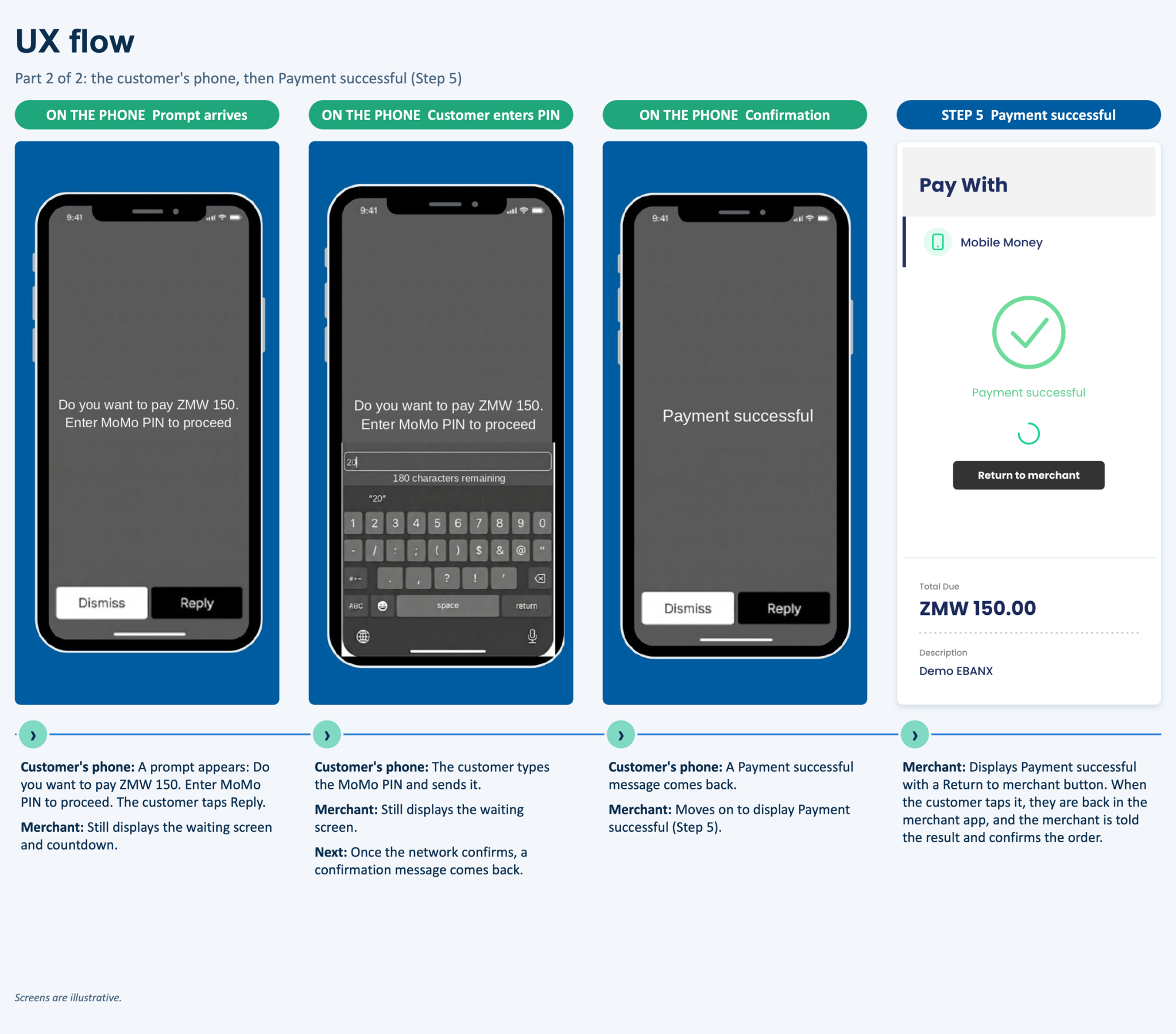
The screens below illustrate the end-to-end payment experience with Mobile Money in Zambia. The customer selects Mobile Money, chooses the mobile network operator and enters the phone number linked to the wallet. A prompt is then pushed to the handset, where the customer authorizes the payment with the wallet PIN. Once the operator confirms the debit, the customer is returned to the merchant with a confirmation screen.
The screens are for illustrative purposes only.
Merchant Page: Equivalent to what you build in your own checkout.
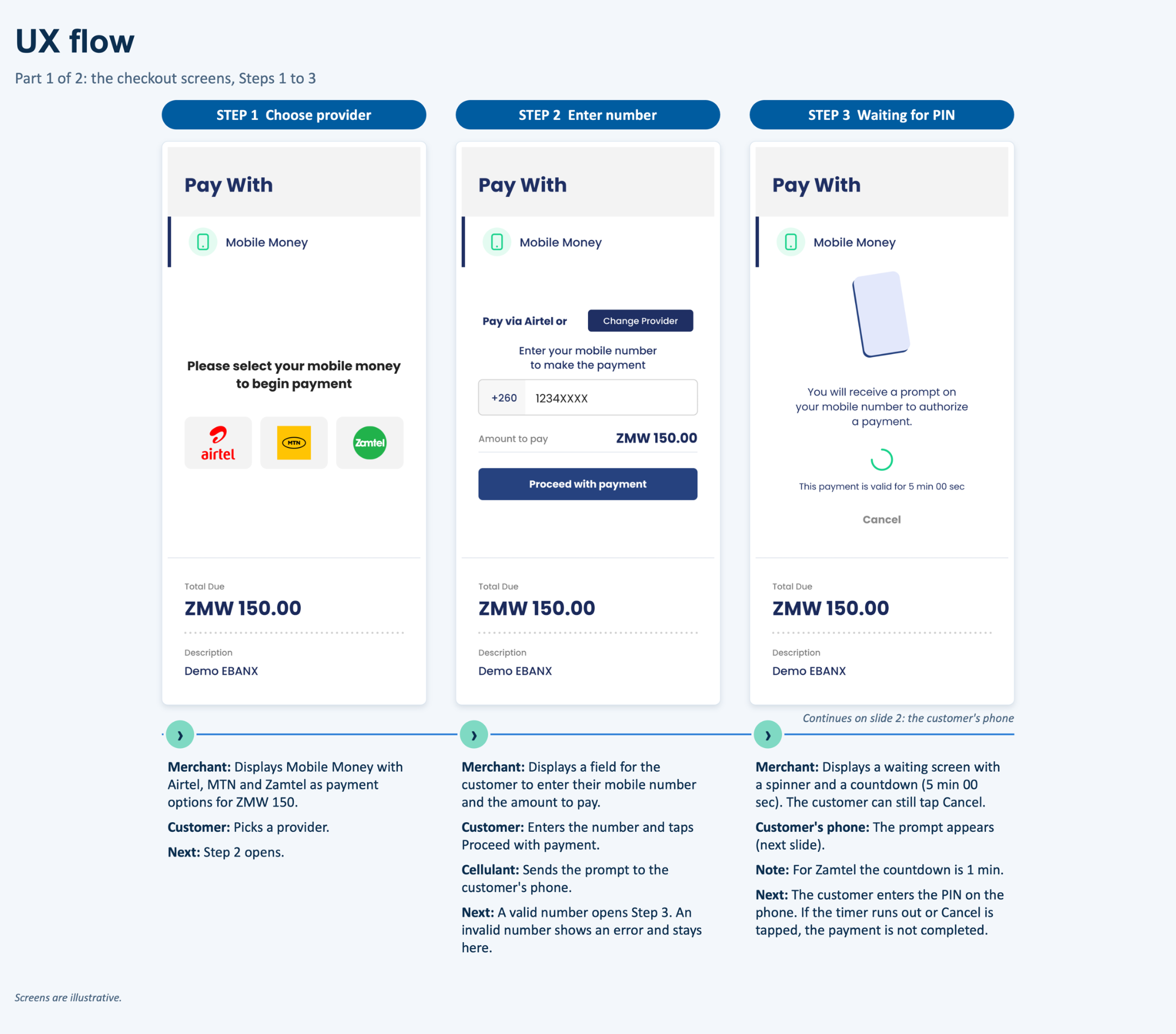
On step three the merchant may optionally display a countdown timer to indicate how much time the customer has to approve the payment.
The payment approval window varies by MNO and is calculated from the open_date:
- MTN: 5 minutes
- Airtel: 5 minutes
- Zamtel: 1 minute
Phone Screens: Note, this is controlled by MNO and may vary depending on the provider.
Flow summary
| Step | Controlled by | Description |
|---|---|---|
| 1 | Merchant | Display Mobile Money on the checkout page and let the customer choose the operator: Airtel Money, MTN Mobile Money or Zamtel Kwacha. |
| 2 | Merchant | Ask the customer for the phone number linked to the mobile wallet, in full international format with the 260 country code, and confirm the amount in ZMW. |
| 3 | Merchant | Submit the charge to EBANX. The payment is created as pending (PE) and the prompt is pushed to the handset. |
| 4 | Merchant | Display a payment instruction page telling the customer to approve the payment on the handset, with the remaining time. |
| 5 | Operator | The operator sends the prompt to the customer's phone asking to authorize the amount. |
| 6 | Operator | The customer enters the Mobile Money PIN on the handset. This is the only data the customer types in the Mobile Money flow, which is why the full name and e-mail address must be collected by the merchant in its own checkout. |
| 7 | Operator | The operator confirms the debit to the customer by message. |
| 8 | Merchant | EBANX receives the confirmation asynchronously and also queries the provider on a schedule, so the payment changes from pending (PE) to confirmed (CO). Display the final confirmation screen to the customer. |
Resources
Contact our sales engineering for the following resources when testing in your sandbox environment.

API Reference
Click here to access detailed API documentation to integrate efficiently.

Mock Customer Data
Click here to view mock customer data for testing and validating user flows.

Error Codes
Click here to review common error codes to troubleshoot and resolve issues quickly.
Still need help?

We hope this article was helpful. If you still have questions, you can explore the following options:
- Merchant support: Contact our support team at sales.engineering@ebanx.com for assistance.
- Not a partner yet? Please complete the Merchant Signup Form, and our commercial team will reach out to you.
