# PSE Avanza
> Learn how to use PSE Avanza as one of your payment methods in Colombia with EBANX Direct API.
# PSE Avanza
PSE Avanza (Pago Seguro en Línea) is a popular online payment method in Colombia that allows customers to make secure, real-time payments directly from their bank accounts. Integrating PSE Avanza with EBANX enables merchants to offer Colombian customers a familiar and trusted way to complete online transactions, ensuring higher conversion rates. This integration provides merchants with a reliable, secure, and localized payment solution in Colombia.
## Requirements
- **API authentication** - All API requests must be authenticated using [JWS (JSON Web Signature)](/docs/get-started/api-authentication/jws-authentication). The legacy `integration_key` is being deprecated — if you still use it, follow the [Migration Guide](/docs/get-started/api-authentication/jws-migration) to transition to JWS. If you don't have credentials yet, complete the [Merchant Signup Form](https://www.ebanx.com/en/contact/).
- **Familiarity with EBANX Direct** - This setup follows the same general structure as other payment methods, with a few unique parameters.
## How it works
- **Customer initiates payment** - At checkout, your customer selects PSE Avanza as the payment option.
- **Bank selection** - A dropdown menu displays the list of banks retrieved from the **`/ws/getBankList`** endpoint. Customers select their preferred bank, and the corresponding bank code is used in the **`bank_code`** parameter.
- **Authentication & authorization** - Customers are redirected to their bank’s PSE Avanza interface, where they log in and authorize the payment using their bank credentials.
- **Payment confirmation** - Once authorized, EBANX will send you a notification of the status change for the payment.
- **Order fulfillment** - Once payment is confirmed, you fulfill your customer order.
## Instructions
Follow the steps below.
### Select your environment
Select the appropriate environment for your integration. Use the sandbox environment for testing, or the production environment for live transactions. Use the URL for your HTTP requests based on your selection.
- **Cross-border sandbox:** `https://sandbox.ebanxpay.com/ws/direct`
- **Cross-border production:** `https://api.ebanxpay.com/ws/direct`
- **Local sandbox:** `https://sandbox-local-latam.ebanxpay.com/ws/direct`
- **Local production:** `https://api-local-latam.ebanxpay.com/ws/direct`
Check the method's availability for your country and tenant in [Payment Methods by Country](/docs/pay-in/processing/payment-methods/payment-methods-overview#payment-methods-by-country). Questions about tenant and environment? Check our [API Operability](/docs/get-started/api-operability) and [API Endpoints](/docs/get-started/api-endpoints).
### Prompt customer to choose a bank
To initiate a payment with PSE Avanza, customers need to select their preferred bank from a dropdown menu in your payment form. The list of banks, obtained from the **/ws/getBankList** endpoint, should be displayed as options in the dropdown. Once the customer selects a bank, its corresponding bank code should be assigned to the `bank_code` parameter for the next step of the payment process.
Parameters
- integration_key - Your EBANX integration
key
- payment_type - Set to achpse
- country - Set to co (for Colombia)
```bash
curl -X GET \
--location 'https://sandbox.ebanxpay.com/ws/getBankList' \
--header 'Content-Type: application/json' \
--data '{
"integration_key": "your_ebanx_integration_key",
"payment_type": "achpse",
"country_code": "co"
}'
```
```json
[
{
"code":"1815",
"name":"ALIANZA FIDUCIARIA"
},
{
"code":"1001",
"name":"BANCO DE BOGOTA"
},
{
"code":"1063",
"name":"BANCO FINANDINA S.A. BIC"
}
]
```
Use the bank list to prompt your customer to make a selection.
The bank_code in your payment request should be populated with `code`.
### Define your parameters
With **PSE Avanza** payments, customers are redirected to a secure third-party website to complete the payment quickly and safely. To obtain this redirection link, call the **/ws/direct** endpoint with the required parameters.
At the API Reference Guide, select Colombia and PSE Avanza from
the dropdown menus.
### Sample request
Use the following example to initiate a request.
```bash
curl -X POST \
--location 'https://sandbox.ebanxpay.com/ws/direct' \
--header 'Content-Type: application/json' \
--data '{
"integration_key": "{{integration_key}}",
"payment": {
"name": "John Doe",
"email": "john.doe@example.com",
"document": "{{tax_id}}",
"phone_number": "5555555555",
"country": "co",
"payment_type_code": "achpse",
"bank_code": "{{bank_code}}",
"merchant_payment_code": "{{unique_merchant_code}}",
"currency_code": "COP",
"amount_total": 99.85
}
}'
```
> **Local processing in Colombia requires IVA data**
> If your Colombian payments are processed by EBANX as a local entity (`LOCAL_LATAM`) and your merchant account is enabled for single transaction and parameter taxes, the request body must also split the charged amount between the local and cross-border portions and declare the Colombian IVA (value-added tax). Add `single_transaction.amount_local`, `single_transaction.amount_crossborder`, and `taxes.iva_co` to the `payment` object. When `amount_local` is positive, omitting the `taxes` object is rejected with `BP-TX-01` and omitting `taxes.iva_co` with `BP-TX-02`. Sending `single_transaction` without the capability enabled is rejected with `BP-ST-00`.
The example below repeats the request above with the fields required for local processing highlighted:
```bash
curl -X POST \
--location 'https://sandbox.ebanxpay.com/ws/direct' \
--header 'Content-Type: application/json' \
--data '{
"integration_key": "{{integration_key}}",
"payment": {
"name": "John Doe",
"email": "john.doe@example.com",
"phone_number": "5555555555",
"document_type": "CE",
"document": "{{tax_id}}",
"country": "co",
"payment_type_code": "achpse",
"bank_code": "1815",
"merchant_payment_code": "{{unique_merchant_code}}",
"currency_code": "COP",
"amount_total": "99.85",
"single_transaction": {
"amount_local": 99.85,
"amount_crossborder": 0
},
"taxes": {
"iva_co": 0
}
}
}'
```
### Sample response
A successful request will return a response similar to the example below. The `payment.redirect_url` parameter contains the link to the third-party website.
```json
{
"redirect_url": "{{redirect_url}}",
"payment": {
"hash": "59acc5f00945fa382ab051651440826da7701533249b3a475",
"country": "co",
"merchant_payment_code": "{{unique_merchant_code}}",
"status": "PE",
"status_date": "{{YYYY-MM-DD HH:mm:ss}}",
"open_date": "{{YYYY-MM-DD HH:mm:ss}}",
"confirm_date": null,
"transfer_date": null,
"amount_br": "99.85",
"amount_ext": "99.85",
"amount_iof": "1",
"currency_rate": "1",
"currency_ext": "COP",
"due_date": "{{YYYY-MM-DD}}",
"instalments": "1",
"payment_type_code": "achpse",
"pre_approved": false,
"redirect_url": "{{redirect_url}}"
},
"status": "SUCCESS"
}
```
[Merchant Area](https://dashboard.ebanx.com)
### Redirect customer to the returned URL
Redirect your customer to the URL returned in the parameter `redirect_url`. After the redirection, your customer will be at a third-party website with all the necessary purchase details to finalize their payment securely.
#### Testing PSE Avanza in a sandbox environment
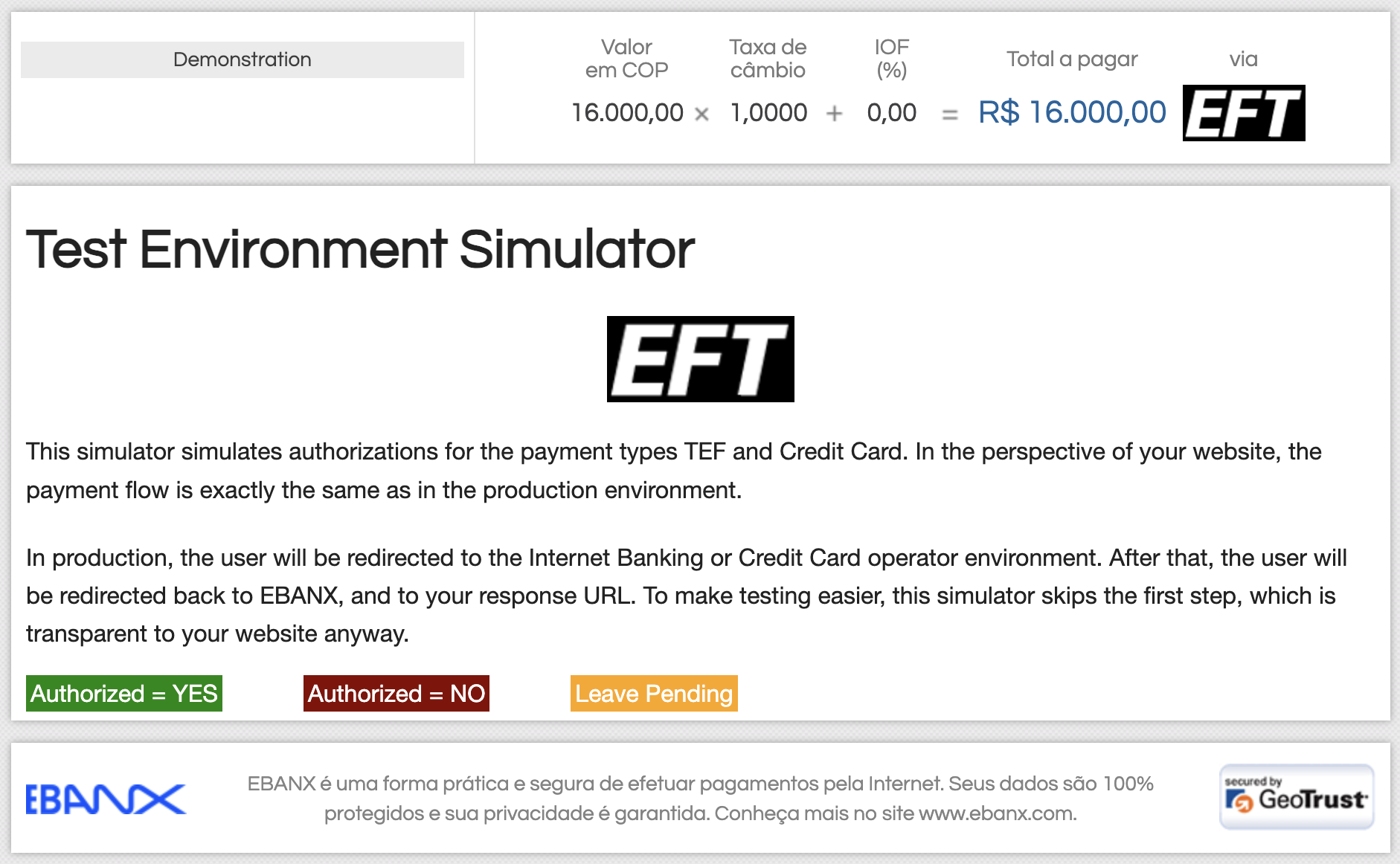
In our Sandbox environment, we provide a PSE Avanza simulation interface to test bank transfer payments. This mock interface allows you to simulate different payment outcomes:
- Simulate Authorized = YES: Confirms the payment as successful.
- Simulate Authorized = NO: Denies the payment.
- Leave Pending: Leaves the payment in a pending state.
This simulation mimics the real production flow, where users are redirected to their Internet Banking to complete transactions, enabling you to thoroughly test authorized and unauthorized payments.
### Monitor payment for status changes
**Notifications**
- EBANX will send a notification whenever a payment status changes.
- Make sure your system is set up to receive notifications from EBANX for any changes in payment status.
- [Learn more about Payment Notifications](/docs/pay-in/management/status-and-retrieval/payment-notifications)
**Status**
- After receiving a notification that status has changed, retrieve the payment status.
- When a payment is confirmed, the status will change from **pending** (**PE**) to **confirmed** (**CO**).
If the customer does not complete the payment, the status will eventually change to **cancelled** (**CA**).
- [Learn more about Retrieving Payment Status](/docs/pay-in/management/status-and-retrieval/retrieve-payment)
### Congratulations!
You have successfully integrated **PSE Avanza**.
For more information, refer to the [Direct API reference guide](/api-reference?api=pay-in&page=direct)
## Resources
Use the following resources when testing in your sandbox environment.
- [Sample Cards](/docs/pay-in/dev-tools/sandbox-simulation/test-credit-cards)
- [API Reference](/api-reference)
- [Mock Customer Data](/docs/pay-in/dev-tools/sandbox-simulation/test-customer-data)
- [Error Codes](/docs/pay-in/dev-tools/response-codes/api-error-codes)
## Still need help?
If you still have questions, you can explore the following options:
- **Merchant support:** Contact our support team at [sales.engineering@ebanx.com](mailto:sales.engineering@ebanx.com) for assistance.
- **Not a partner yet?** Complete the [Merchant Signup Form](https://business.ebanx.com/en/request-contact), and our commercial team will reach out to you.